Sitekey List area
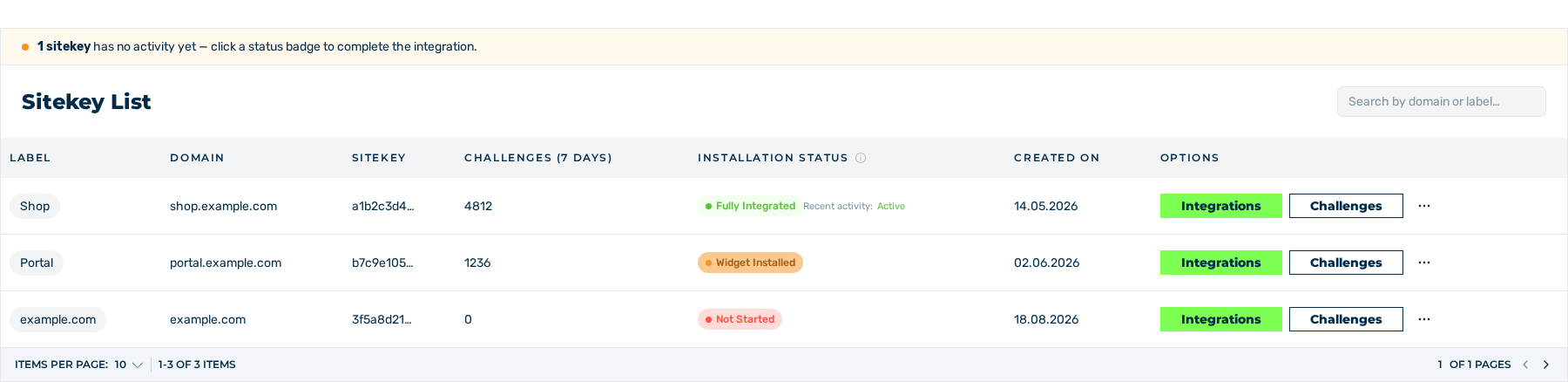
Sitekey List area
The Sitekey List area lists all sitekeys that you have access to. From the list, you open a sitekey, create a new one, and delete the available entries.
The list of the sitekeys and its columns
Columns
The table contains the following columns:
| Column | Contents |
|---|---|
| Label | Label of the sitekey. Without a label, the domain is shown. |
| Domain | Protected domain of the sitekey |
| Sitekey | First eight characters of the public key |
| Challenges (7 days) | Count of the challenges of the last seven days |
| Installation Status | State of the integration |
| Created on | Date of the creation |
| Options | Actions for the entry |
A search field with the Search by domain or label… placeholder decreases the list. While no sitekey is available, the table shows the No Sitekeys added note.
Below the table, a footer moves through the entries. You can set the count of the entries for each page to 5, 10, 15, 30, 50, or 100.
Above the table, a note is shown as soon as one sitekey or more on the shown page has the value 0 in the Challenges (7 days) column: N sitekeys have no activity yet — click a status badge to complete the integration. In the note, N is the count of the applicable sitekeys. For a single sitekey, the note is 1 sitekey has no activity yet — click a status badge to complete the integration.
Above the new sitekey, the Click here for integration details bubble is shown. The bubble is removed as soon as you click on the Integrations button.
For a sitekey with the protection switched off, the Training mode badge is also shown in the Label column.
For a sitekey that a different account shared, the Read or Write badge follows in the Label column.
Installation status
The Installation Status column has one of these values:
| Value | Meaning |
|---|---|
| Not Started | No activity of the widget was detected yet. |
| Widget Installed | The widget loads, but the server-side verification is still missing. |
| Fully Integrated | The widget loads, and your server verified the token one time or more. |
A tooltip tells about the applicable value. The value is a milestone that the sitekey reached one time. It does not go back to an earlier value.
The value is also a button. For the Not Started value, the button opens the Integration view. For the other values, it opens the Integration Test view.
Recent activity
For the Fully Integrated value, the Recent activity: label is shown below the installation status. It has one of these values:
| Value | Meaning |
|---|---|
| Active | A server-side verification occurred in the last 24 hours. |
| Inactive | No server-side verification occurred in the last 24 hours. |
| – | No value is available yet. |
The installation status stays, but this value changes with the traffic. A change back to Inactive in quiet periods is usual.
Actions
The Options column contains the following actions:
| Action | Effect |
|---|---|
| Integrations | Opens the sitekey with the Details view. |
| Challenges | Opens the Challenges view of the sitekey. |
| CONFIG | Opens the Configuration Settings dialog. |
| PERMISSIONS | Opens the Permissions view of the sitekey. |
| DELETE | Opens the Delete Sitekey? dialog with the Cancel and Delete buttons. |
The CONFIG, PERMISSIONS, and DELETE actions are in the menu behind the button with the three dots. The PERMISSIONS and DELETE actions occur only for the owner of the sitekey.
See Create a sitekey and Delete a sitekey.