Trial period
Every new account starts with a free trial period of 30 days and full access to all functions. No payment details are required to start the trial period.
The trial period is followed by a grace period of seven days. After that, the account rests until a plan has been selected.
The following sections explain the following topics:
- ■ Commit to a plan during the trial period describes how the Captcha Starter plan is reserved without an immediate debit.
Course of the trial period
The customer portal shows the state of the trial period in a banner at the top of the pages. The banner changes with the remaining time:
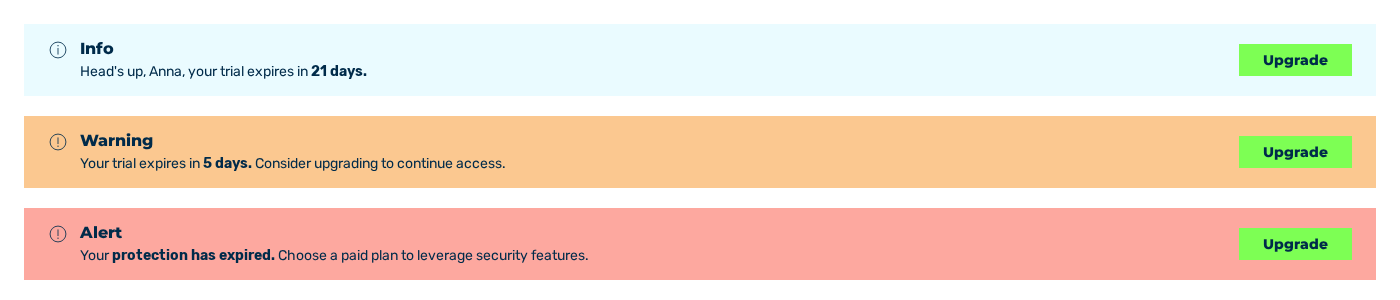
The three banners of the trial period: Info, Warning and Alert
The following states are possible:
| State | Banner | Message |
|---|---|---|
| More than 7 days remaining | Blue Info banner | Head's up, [first name], your trial expires in [N] days. |
| 7 days or fewer remaining | Yellow Warning banner | Your trial expires in [N] days. Consider upgrading to continue access. |
| Grace period | Red Alert banner | Your protection has expired. Choose a paid plan to leverage security features. |
| After the grace period | Lock over the customer portal | TRIAL ENDED |
Every banner contains the Upgrade button. It leads to the Plans tab of the Account view. See Plans tab.
The banner does not appear in the Account view and on the pages for the plan selection and the payment. It also disappears as soon as a plan is booked or committed to.
Grace period
The grace period starts with the end of the trial period and lasts seven days. During the grace period, the customer portal remains available.
After the grace period
Once the grace period has expired as well, the TRIAL ENDED lock covers the customer portal. The Choose a plan button leads to the Plans tab. The lock does not cover the Account view and the pages for the plan selection and the payment.
The state has the following consequences:
| Area | Consequence |
|---|---|
| Sitekeys | The sitekeys are set to the trial_expired state. Embedded widgets remain in place but no longer block any requests. The protection is thus lifted. The system updates the state of the sitekeys two times a day. Thus the protection can continue for some hours after the end of the grace period. |
| Secrets | New secrets can no longer be created. The service answers with the TRIAL_EXPIRED error. |
| Account | The account remains in place and is not deleted. |
To restore the protection, select a plan in the Plans tab. See Book a plan and Trial period expired.
Attention
The same consequences for the sitekeys occur when a booked subscription ends. In this case, the customer portal shows neither a banner nor the lock. See Cancel a subscription.
Note
During a running trial period, a plan can be booked in advance without an immediate payment. The plan then carries the Committed badge and starts after the end of the trial period. See Commit to a plan during the trial period.