Challenges
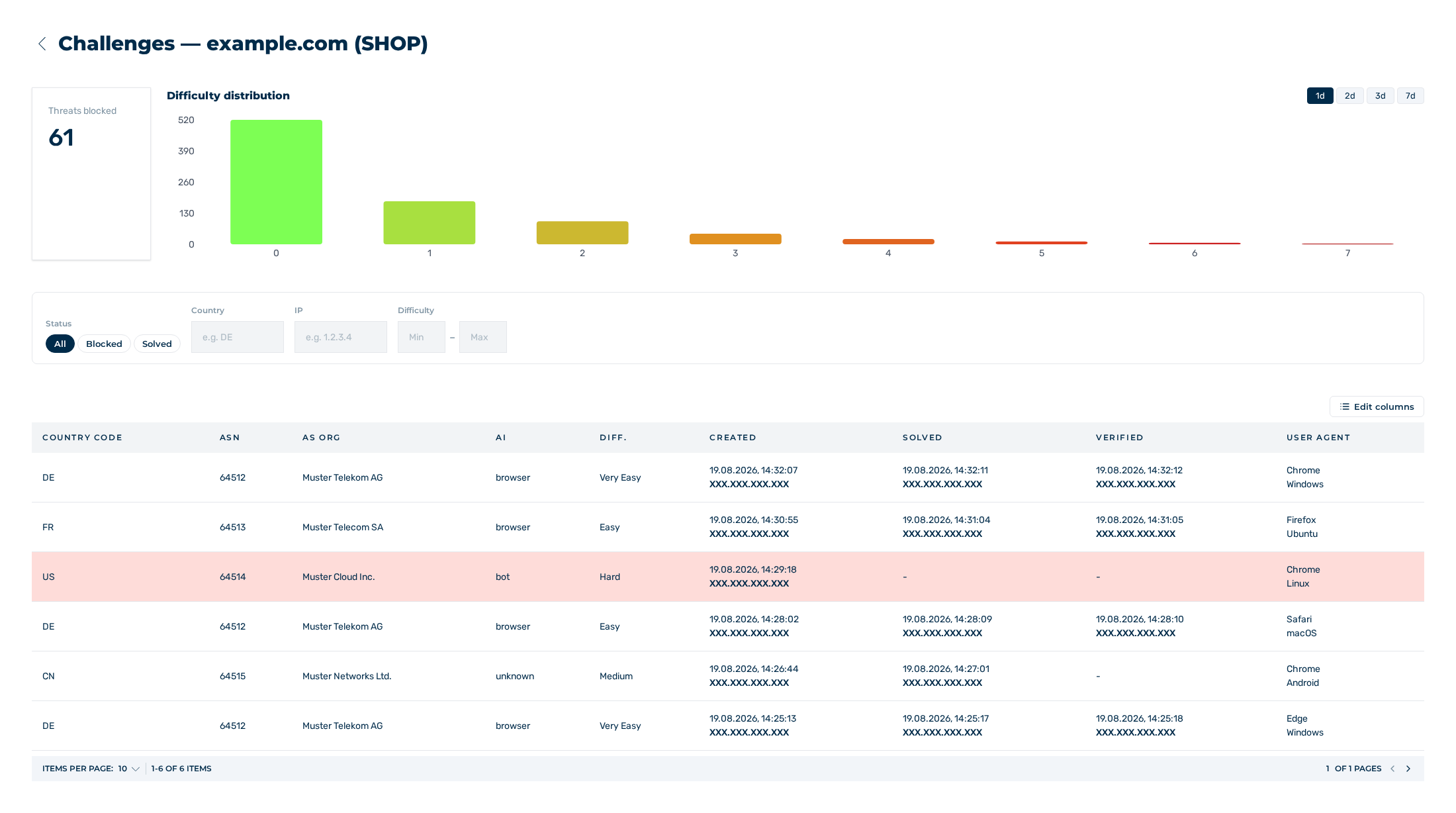
Challenges view
The Challenges view logs the challenges of this sitekey. From the log, you can see which requests were blocked and which were permitted. The heading is Challenges —
The log of the challenges and its filters
Columns
The table contains the following columns:
| Column | Contents |
|---|---|
| Country Code | Country code of the source |
| ASN | Autonomous system of the IP address |
| As ORG | Operator of the autonomous system |
| AI | Classification of the request: browser, bot, or unknown |
| Diff. | Difficulty of the challenge |
| Created | Time and IP address of the challenge |
| Solved | Time and IP address of the solution |
| Verified | Time and IP address of the server-side verification |
| User Agent | Browser and operating system of the request |
A blocked challenge has a coloured row background. Without a value, the cell shows a hyphen.
While no challenge is available, the table shows the No challenges yet note.
The Edit columns button above the table opens a list with one check box for each column. Use it to hide and to show the applicable columns.
Difficulties
The Diff. column shows the difficulty as text:
| Value | Display |
|---|---|
| 0 | Very Easy |
| 1 and 2 | Easy |
| 3 and 4 | Medium |
| 5 and 6 | Hard |
| 7 | Very Hard |
Filter
Above the table, these filters are available:
| Filter | Operation |
|---|---|
| Status | The All, Blocked, and Solved buttons |
| Country | Field for the country code, with the e.g. DE placeholder |
| IP | Field for the IP address, with the e.g. 1.2.3.4 placeholder |
| Difficulty | Two fields, Min and Max, for the range 0 to 7 |
As soon as one filter is set, the Clear filters button is shown. It resets all the filters.
The filters apply to the loaded page of the table, not to all the records.
Extent of the log
Below the table, you can move through the log and select the count of entries for each page from the values 5, 10, 15, and 30.
Without a subscription in operation, the log ends at entry 30. If you move beyond it, the Upgrade dialog opens with the Cancel and Upgrade buttons. The Upgrade button goes to the selection of the plans. With a subscription in operation, all the log is available.
See Plans tab.
Distribution of the difficulty
Above the filters, the Difficulty distribution graph is shown. Its bars show how many challenges apply to the difficulties 0 to 7. The 1d, 2d, 3d, and 7d buttons select the time range.
To the left, the Threats blocked key figure names the count of the blocked requests in the selected time range.
See How EU CAPTCHA works.