Deleting a sitekey
Delete a sitekey only after you removed the widget from the related website.
The following requirements are met:
- ☑ You are the owner of the sitekey.
- ☑ The widget is removed from the protected website, or the website is not in operation any more.
Proceed as follows to delete a sitekey:
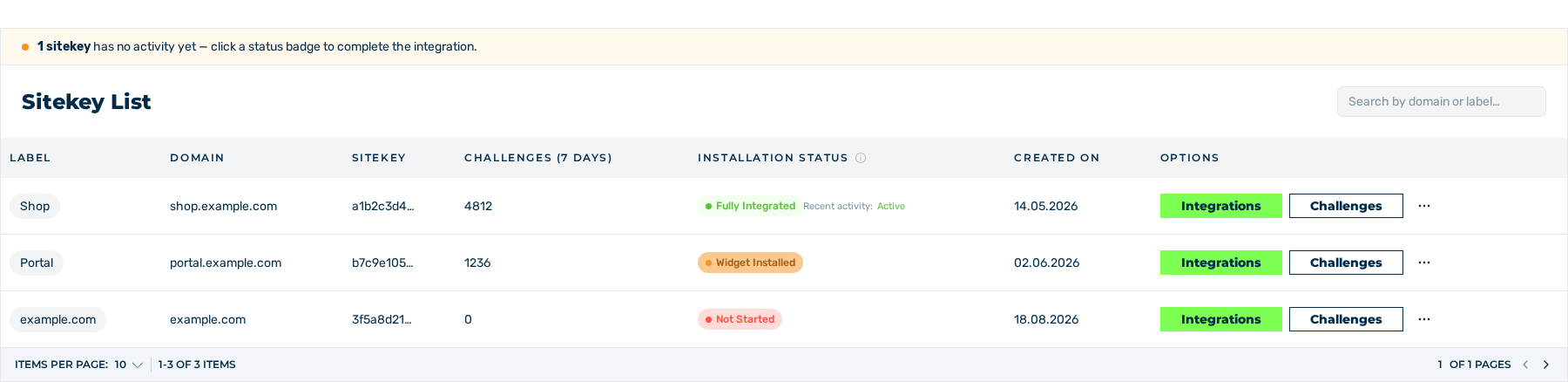
Sitekey List area
- ► Open the Dashboard view and go to the Sitekey List area.
- ► In the row of the sitekey, click on the button with the three dots in the Options column.
- ► In the menu, click on the DELETE entry.
- ↳ The Delete Sitekey? dialog is shown.

Delete Sitekey? dialog
- ► Click on the Delete button.
- ➔ The system deletes the sitekey and shows Success with the text Sitekey deleted successfully. The entry is removed from the list.

Sitekey List area without the deleted entry
Attention
The system marks the sitekey as deleted and hides it in the customer portal. After that, you cannot manage its permissions and additional secrets.
If the deletion is not successful, the system shows Error with the text Can not delete the Sitekey.
To stop the operation, click on the Cancel button in the dialog.