Logins tab
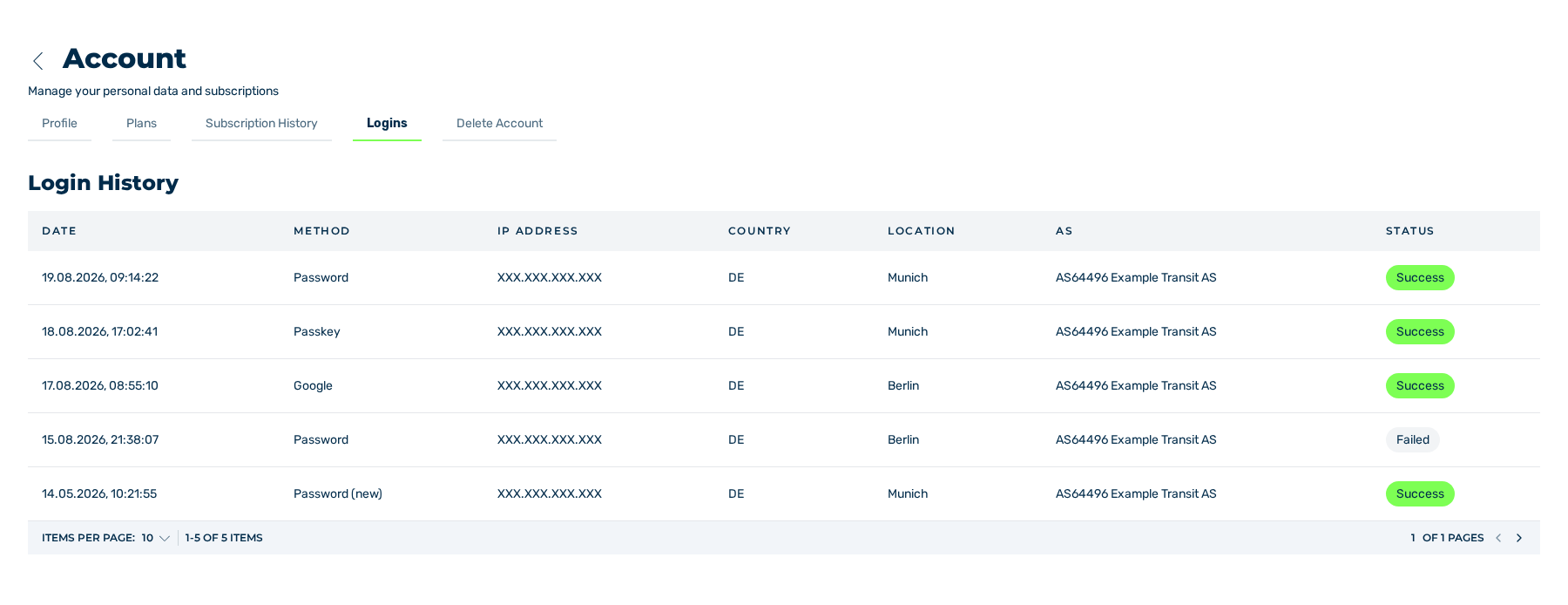
Logins tab
The Logins tab logs the logins to your account. From the log, you can see when and from where a login occurred. The table has the Login History heading.
The log of the logins
Columns
The table contains the following columns:
| Column | Contents |
|---|---|
| Date | Time of the login in the DD.MM.YYYY, hh:mm:ss format |
| Method | Login method that was used: Email (e-mail address and password), Passkey, Google, Apple, Github, Okta, Saml, 2fa (login with two-factor authentication), or Registration. The first entry of a new account has the (new) text: after the registration with an e-mail address, the Registration entry; for an account that was created at the first login with Google, Apple, GitHub, Okta, or SAML, the entry of this provider. |
| IP Address | IP address that the login came from |
| Country | Country code of the IP address, for example DE |
| Location | Location of the IP address. If there is no location, the country is shown. |
| AS | Autonomous system of the IP address with its number and its name, for example AS64496 Example Transit AS |
| Status | Result of the login as a coloured Success mark. The log contains successful logins only. The system does not record failed login attempts. |
A column with no value contains a -.
Below the table, you go through the log and select the count of the entries for each page. At the start, the table shows 10 entries for each page. You can set the count of the entries for each page to 5, 10, 15, 30, or 50.
While no entry is available, the table shows the No login events note.
Attention
If the log contains a login that you cannot identify, change your password immediately and activate the two-factor authentication. See Change the password.
E-mail for a login from a new location
If a login comes from a combination of country and location that is not in the log yet, then the system sends an e-mail with the subject EU Captcha – sign-in from a new location to your e-mail address. The e-mail gives the location, the IP address, the time, and the login method, and it contains a link for the password reset. The registration does not cause such an e-mail. A login from a different location in the same country causes it.