Commit to a plan during the trial period
During a running trial period, the Captcha Starter plan can be committed to in advance without an immediate debit. The customer portal stores the payment method and debits it only at the end of the trial period. The plan becomes active automatically at the same moment. Approximately three days before the first debit, the system sends an e-mail with the date of the debit, the plan, and the amount.
When the payment method is stored, the system does not debit an amount. Your bank can ask for a confirmation at this point, for example with 3-D Secure. If you commit to the plan only during the grace period, then the system debits immediately, and the plan becomes active immediately.
All other plans as well as every purchase after the end of the trial period run through the ordinary payment process and are debited immediately. See Book a plan.
The following requirements are met:
- ☑ Your account is in a running trial period. See Trial period.
- ☑ Neither a paid plan nor a commitment exists for your account.
Proceed as follows to commit to the Captcha Starter plan:
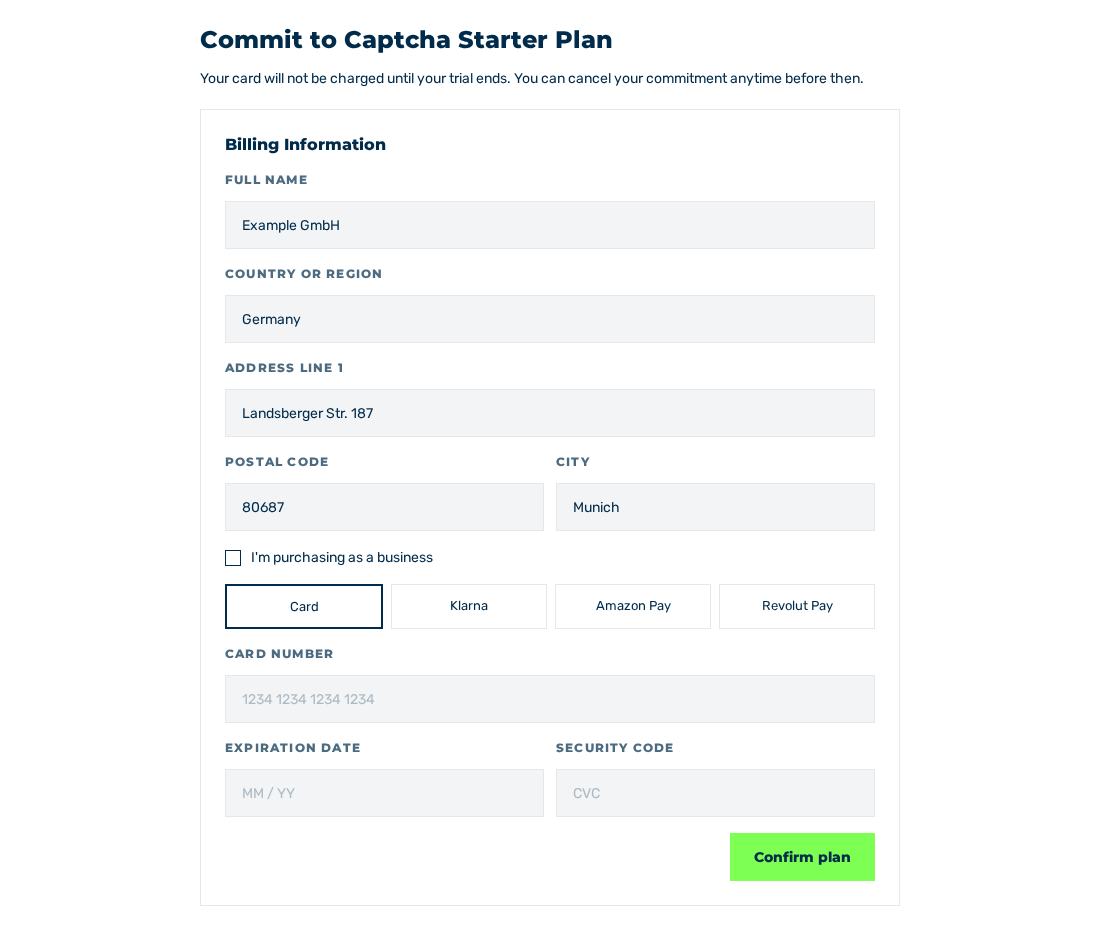
Commit to Captcha Starter Plan view with the Billing Information area
- ► Open the entry Account › Profile through the side bar and change to the Plans tab.
- ► Click the Buy now button in the Starter plan.
- ↳ The Commit to Captcha Starter Plan view is shown with the notice Your card will not be charged until your trial ends. You can cancel your commitment anytime before then.
- ► Fill in the billing address in the Billing Information area.
- ► Select a payment method and enter the corresponding data.
- ► Click the Confirm plan button.
- ↳ During the processing, the button carries the label Processing....
- ➔ The You're all set! view is shown and names the date of the first debit.
The following payment methods are available:
| Payment method | Description |
|---|---|
| Card | Credit or debit card. |
| Klarna | Payment through Klarna. |
| Amazon Pay | Payment through Amazon Pay. |
| Revolut Pay | Payment through Revolut Pay. |
Note
As a company, select the I'm purchasing as a business check box and enter your VAT identification number in the VAT Number (optional) field. Enter the name of the company in the Full name field. This name appears on the invoice.
Withdraw a commitment
The commitment can be withdrawn at any time until the end of the trial period. Until then, no payment has taken place.
If a plan is committed to, the mark above the offer in the Plans tab gives the start date, for example Captcha Starter Plan committed — activates on 13.06.2026. The Subscription History tab carries the entry with the Committed mark and the Cancel commitment button.
How a commitment is withdrawn is described under Cancel a subscription.
Note
After the withdrawal, the trial period continues until its original end date. The dialog names this date.