Integration
The integration of the Myra EU CAPTCHA always has two parts: the widget in your page and the verification of the token on your server. Only both parts together give protection.
For the usual platforms, there are libraries, extensions, and examples that do these two parts. The subsequent chapters give the installation, the configuration, and the verification for each platform.
Note
The guides of this chapter need a sitekey that is already created. The way from a new account to the examined integration is given under Initial setup with the steps Create the first sitekey, Embedding the widget, and Testing the integration.
Structure of an integration
Each integration does these three steps:
| Step | Location | Content |
|---|---|---|
| 1 | Frontend | Load the verify.js script from the CDN. |
| 2 | Frontend | Add the widget element with the public sitekey. |
| 3 | Backend | Verify the token with the /verify endpoint before the processing. |
See Embedding the widget.
Note
The two frontend steps occur in the browser of the visitors. If your website sends a Content Security Policy, then it must permit the addresses of the service. This requirement applies to each platform of this chapter. See Content Security Policy.
Available instructions
These instructions are available:
| Category | Platforms |
|---|---|
| CMS | WordPress, Joomla, Drupal, TYPO3 |
| Frontend | HTML and JavaScript, React, Vue, Angular, Svelte |
| Backend | PHP, Symfony and Laravel, Python, Django, Ruby, Java, Client from the specification |
| Mobile apps | Android, iOS, Flutter |
| Infrastructure | Caddy, CrowdSec, Traefik |
Full examples
The instructions for each platform give one side of the integration. The examples put both sides together in one continuous case: you protect the contact form of an application that already operates. You change only a small number of files.
These examples are available:
| Example | Frontend | Backend |
|---|---|---|
| React and PHP | React with Vite | PHP |
| Vue and Python | Vue with Vite | Python with Flask |
| Angular and Java | Angular | Java with Spring Boot |
| Svelte and Ruby | Svelte with Vite | Ruby with Sinatra |
| HTML and Django | HTML without a framework | Django |
Data from the customer portal
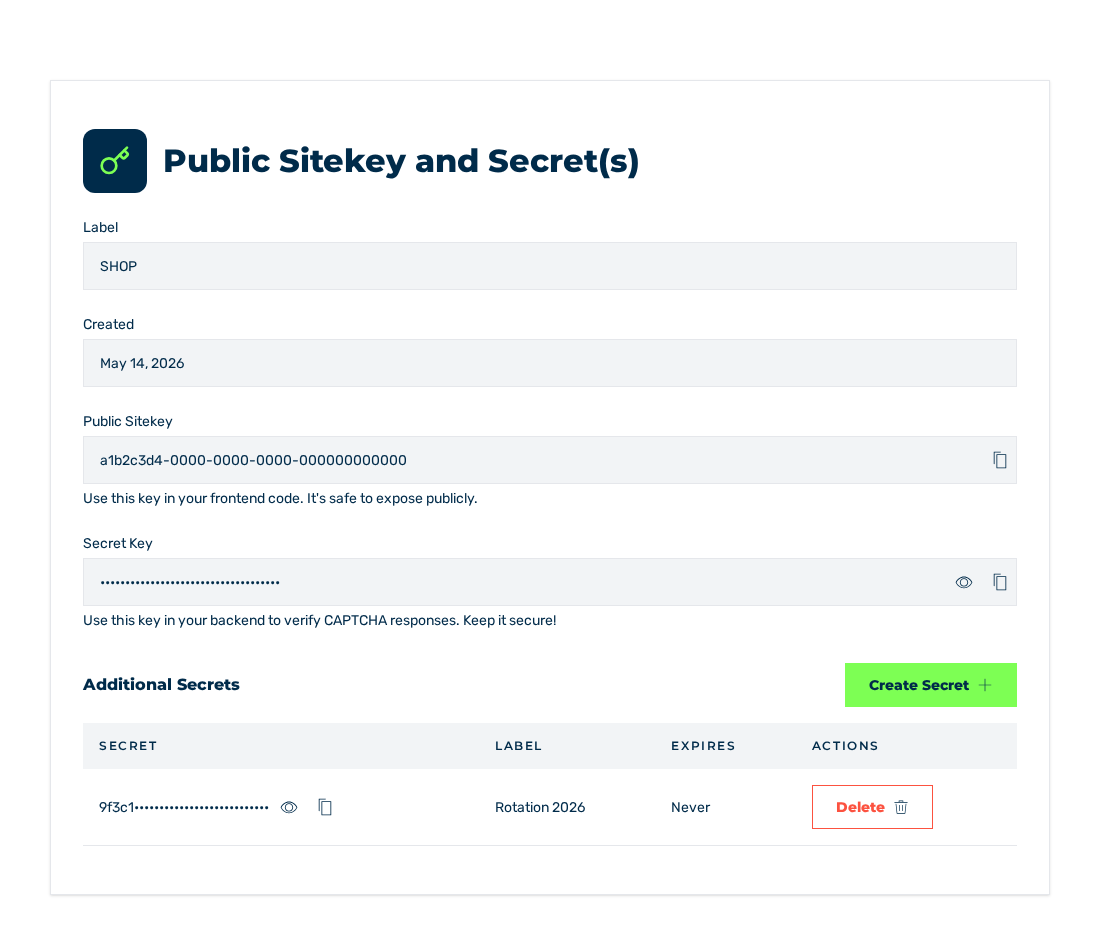
Details view
All instructions need this data from the Details view of the sitekey:
| Data | Use |
|---|---|
| Public Sitekey | In the widget element and in the configuration of the frontend. The value is public. |
| Secret Key | Only in the verification on the server. The value stays on the server. |
See The Details view.